Overview

The Multi-Purpose File Renamer is a versatile tool designed to help users batch-rename files within a specified directory quickly and efficiently. It offers multiple renaming options to customize filenames. This application is particularly useful for photographers, researchers, software developers, and anyone who needs to organize or rename large collections of files in bulk. Download using the link below
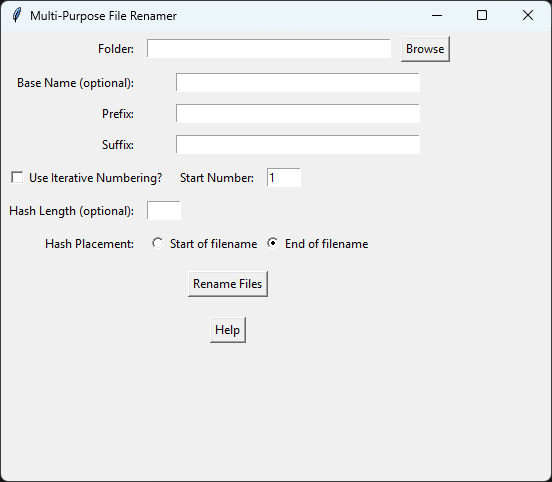
Features
Base Name Change:
- Allows users to entirely replace the original name of each file with a new base name.
- This option requires the use of either Iterative Numbering or a Random Hash to prevent filename conflicts.
Prefix & Suffix:
- Users can prepend a prefix or append a suffix to the file names. This is ideal for categorizing or versioning files.
Iterative Numbering:
- Appends a number to the end of each file name, starting from a user-defined starting number. This is useful when sorting or ordering files.
Random Hash Generation:
- Commonly used for ensuring unique filenames or obfuscating file names for privacy.
- Adds a randomly generated alphanumeric hash of specified length to the start or end of filenames.
How To Use
Select Folder:
- Click the “Browse” button and choose the directory containing the files you want to rename.
Base Name (Optional):
- Enter a base name to completely rename all files. This must be used alongside Iterative Numbering or Random Hash to avoid file conflicts.
Prefix & Suffix (Optional):
- Enter text to be added before or after each file name.
Iterative Numbering:
- Check the box and enter a starting number if you want files to be numbered sequentially.
Random Hash:
- Specify a hash length (between 1-32 for best results) and choose whether to add the hash at the beginning or end of the filenames.
Rename Files:
- Click the “Rename Files” button to apply the changes. All renamed files will retain their original file extensions.
Help:
- Click the “Help” button for detailed instructions on how to use each feature.
Potential Use Cases
- Organizing photography collections with prefixes like EventName_.
- Preparing files for uploading with randomized hashes for privacy.
- Creating consistent file naming schemes for research projects.
- Sorting and versioning files with iterative numbering.
Important
For now at least, it ONLY works on windows
Avoid using special characters in file names (:, /, \, |, *, <, >, ?).
Be aware of file path length limitations on your operating system (usually 255 characters).
Test the program on a small batch of files before applying it to large collections.
Software Agreement
- Acceptance
By downloading, installing, or using this software (“Software”), you agree to be bound by the terms of this license agreement (“Agreement”). If you do not agree to the terms of this Agreement, do not download, install, or use the Software.
- Grant of License
This Agreement is entered into by and between Licensor Name and you, the licensee. Licensor grants you a non-exclusive, royalty-free license to use, copy, modify, merge, publish, distribute, sublicense, and/or sell copies of the Software, and to permit persons to whom the Software is furnished to do so, subject to the following conditions:
- Copyright Notice
This Software is provided “as-is,” without warranty of any kind, express or implied, including but not limited to the warranties of merchantability, fitness for a particular purpose, and non-infringement. In no event shall the authors or copyright holders be liable for any claim, damages, or other liability, whether in an action of contract, tort, or otherwise, arising from, out of, or in connection with the Software or the use or other dealings in the Software.
- User Rights
You are permitted to use the Software for any purpose, commercial or non-commercial, without restriction.
- Redistribution
You may distribute copies of the Software to third parties, provided that this Agreement accompanies the copies and the third parties acknowledge and agree to the terms of this Agreement. The Software must remain freely available and must not be sold or used to restrict others from using the Software for their own purposes.
- Modifications
You are free to modify the Software and distribute your modifications under the same terms as this Agreement. If you distribute the modified software, you must also disclose the source code of the modifications.
- Termination
This license is perpetual unless terminated by Licensor. Your rights under this license will terminate automatically without notice from Licensor if you fail to comply with any term(s) of this license. Upon termination, you shall cease all use of the Software and destroy all copies of the Software in your possession.
- Miscellaneous
This Agreement constitutes the entire agreement between you and Licensor relating to the Software and supersedes all prior or contemporaneous oral or written communications, proposals, and representations with respect to its subject matter. If any part of this Agreement is held invalid or unenforceable, that part will be construed to reflect the parties’ original intent, and the remaining portions will remain in full force and effect.
- User Responsibilities
You agree to bear all responsibility for the lawful and intended use of the Software. The Licensor shall not be liable for any unlawful use or misuse of the Software under any circumstances. You agree to indemnify and hold harmless the Licensor against any claims, damages, or costs arising from your use or misuse of the Software.